Introducing Instant Order Placement on Charts
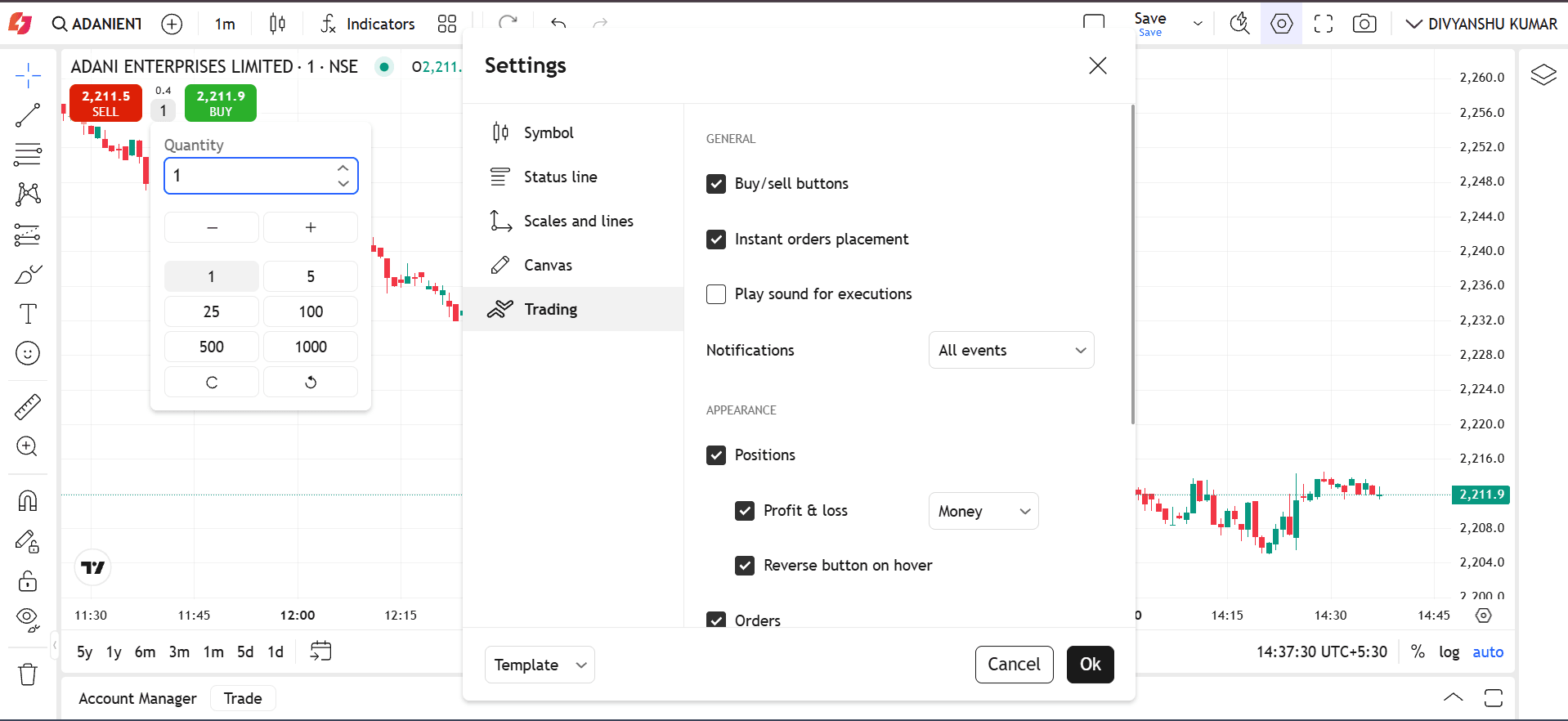
Instant Order Placement on Charts in BlinkX enables traders to place buy or sell orders directly from TradingView charts, without needing to leave the screen or navigate through multiple steps.
Instead of shifting between charting tools and trading apps, you can now execute trades instantly through an integrated order window built right into the TradingView interface.
(Img: Instant Order Placement on Charts)
Features of Instant Order Placement on Charts
Below are the features of Instant Order Placement on Charts:
- Buy and Sell Buttons and Keyboard shortcuts (Shift+B and Shift+S), without confirmation dialogs
- Orders are placed according to the set quantity and at the market price
- The feature combines analysis and execution into a single flow, which reduces execution latency and improves reaction time for active strategies (scalping, momentum, breakout trading)
Benefits of Instant Order Placement on Charts
The following are the benefits of Instant Order Placement on charts:
- One Tap Execution: With a single tap, you can place buy or sell orders instantly. This eliminates the requirement to open a separate order window or fill multiple fields manually.
- Speed & Low Latency: Instant order placement reduces the numberof steps involved in placing an order. This allows you to achieve faster execution with minimal delays, which is critical during volatile or fast-moving market conditions.
- Support Across Trading Segments: Instant order placement provides a unified and consistent trading workflow across multiple segments such as equities, derivatives, commodities, and currencies.
- Streamlined User Experience: You can take action without leaving the chart view. This simplifies the trading process, reduces cognitive load, and helps avoid errors caused by switching screens or manually typing order details.
How to Use on BlinkX Web Trading Platform?
Below are the steps to execute Instant Order Placement on the BlinkX web trading platform:
- Open your chart on BlinkX TradingView.
- Go to Settings → Trading.
- Tick “Instant Orders Placement” and “Ok”
Final Word
Instant order placement on charts empowers traders with a highly efficient execution method. By combining real-time market insight with seamless order execution, it elevates the overall trading experience.

Join thousands of learners