#BlinkX App
13/1/2026
Open Positions now visible on Index Charts
BlinkX now shows your open positions directly on index charts. The moment you open an index chart, your entry price and live P&L appear automatically on the screen.
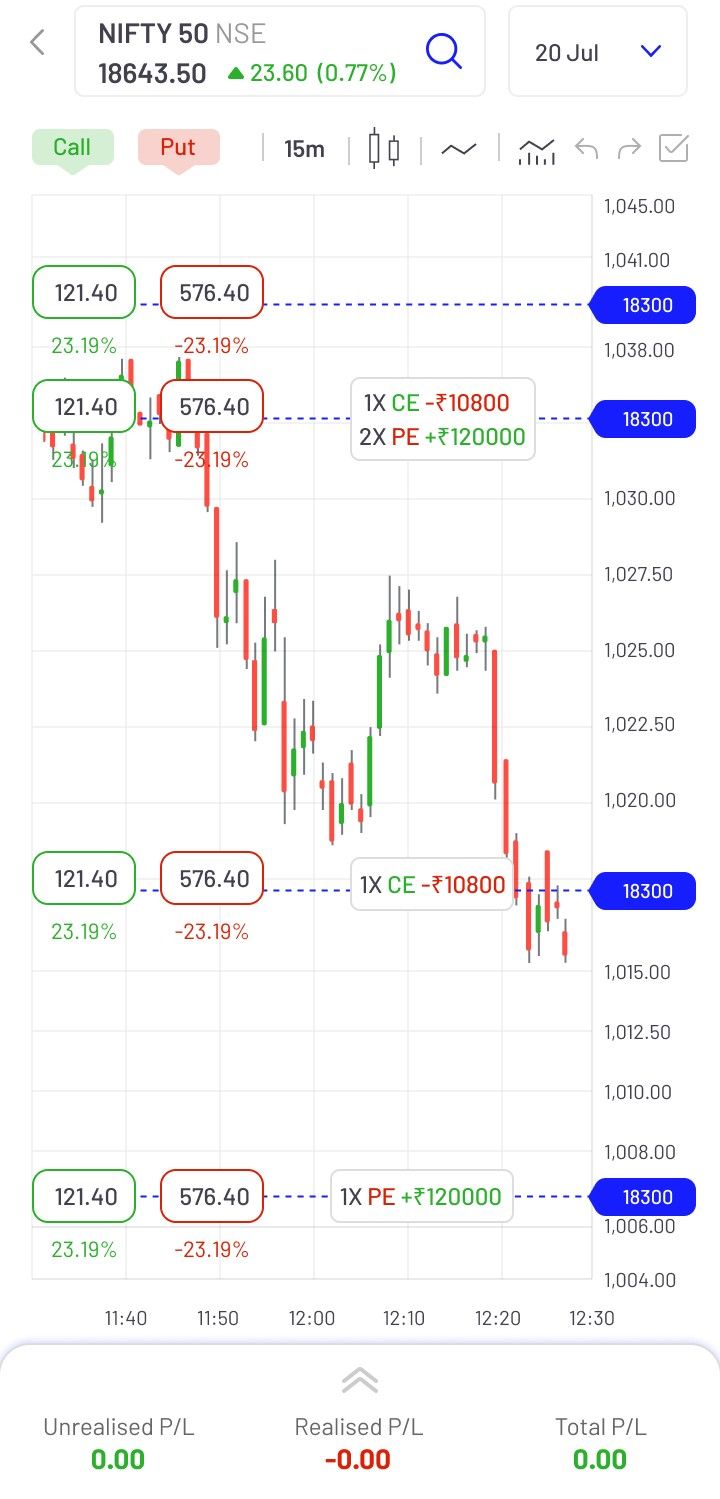
(Image: Open Positions on Charts)
About Open Positions
Whenever you open an index chart on BlinkX, your open positions show up instantly. Your entry price, your live P&L, everything. You don't need to search or switch tabs. You get all trade information directly on the screen.
Benefits of Open Positions
- Immediate visibility of open positions: Your open index positions load automatically on the chart, helping you track them without extra efforts.
- Helps you act faster: When the market moves toward your set price levels, you can see it directly on the chart and take action accordingly.
- Reduces navigation inside the app: You no longer need to switch between different sections to check your live P&L or entry price.
- Improved clarity during analysis: Your position sits on the same candles you are analysing, giving a clearer view of how the market is moving relative to your trade.
How to use on BlinkX App?
Follow the steps below:
- Step 1: Open any index chart on BlinkX
- Step 2: Switch to TradingView charts
- Step 3: If you have an open position, it’ll appear automatically
- Step 4: Tap the marker to see entry price and P&L
- Step 5: Place or exit orders straight from the chart
Final Words
Your trades now appear directly on index charts in BlinkX. With positions, P&L, and price levels visible in real time, you can analyse and act from one place without switching screens.
Disclaimer: The securities are quoted as an example and not as a recommendation.

Join thousands of learners