Discover: Symbol Search on TradingView Charts
A fast and easy symbol search helps traders switch instantly between stocks, indices, futures, and options without interrupting charting or analysis.
The Symbol Search module enables traders to quickly discover and switch to any tradable instrument directly within the TradingView charting interface. Designed for speed, accuracy, and minimal disruption, the feature supports keyboard-based workflows, segment filters, rich metadata display, and real-time results, all of which help traders.
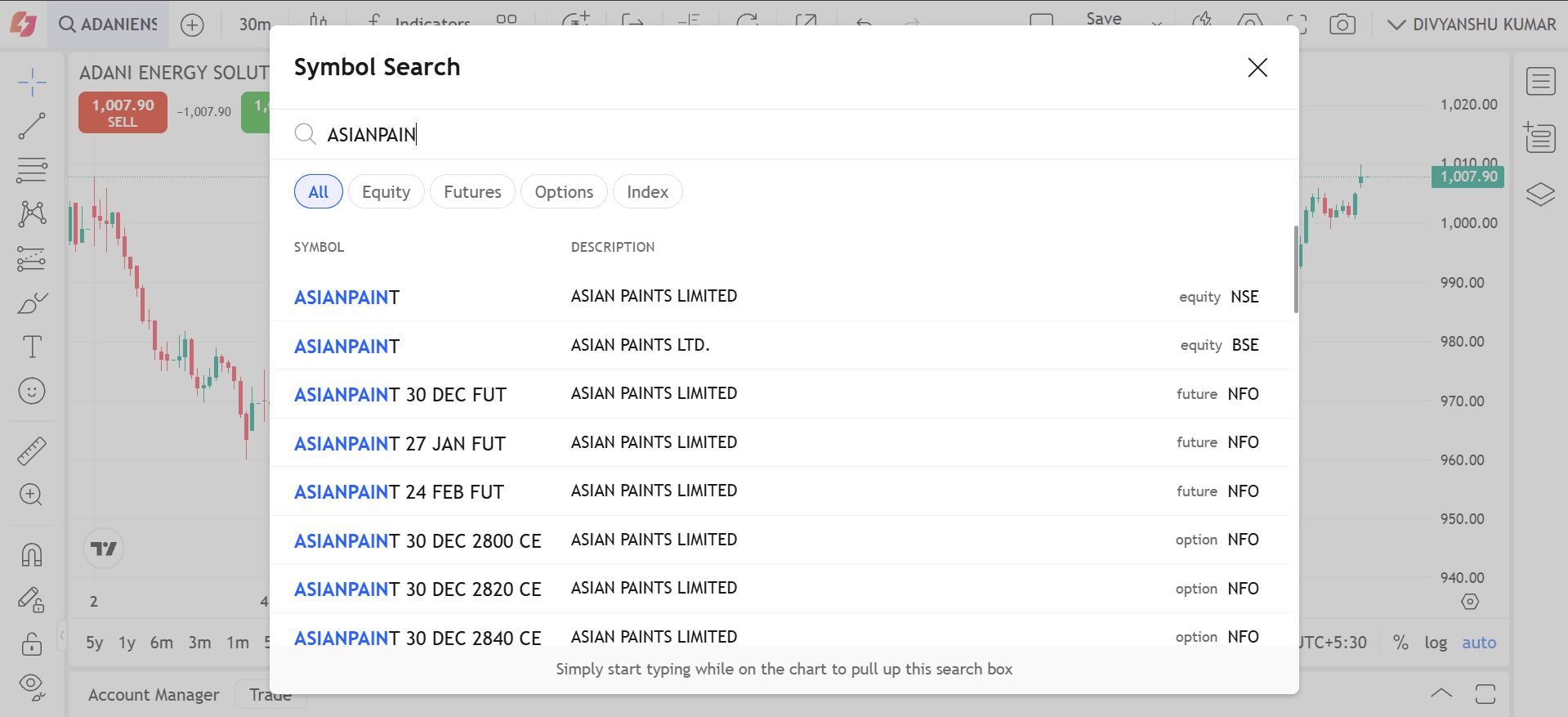
(Image: Symbol Search)
About the Feature
A. Placement & Default Behaviour
- The Symbol Search bar is located at the top-left corner of the chart.
- By default, it displays the current active symbol
Trader Value: Gives traders constant visibility of the active symbol and an always-available entry point for switching charts quickly.
B. Search Module Activation
The search module opens when:
- The search field is clicked
- The trader starts typing anywhere on the chart (TradingView shortcut behaviour)
Upon activation:
- The current symbol is highlighted
- A large scrollable overlay opens above the chart
- Updates results in real time
Trader Value: Allows both mouse-based and power-user keyboard workflows, reducing reaction time during fast market analysis.
C. Real-Time Search Results
Search results include:
- Symbol code
- Symbol description
- Exchange badge (NSE, BSE, etc.)
Trader Value: Delivers fast and accurate symbols without visual clutter, enabling quick access to the right instrument even in fast-moving markets.
D. Segment Filters
Filter tabs at the top of the module include:
- All (default)
- Stocks
- Futures
- Options
- Index
Behaviour:
- One filter is active at a time
- Last-used filter persists for the session
- Fully keyboard-navigable
Trader Value: Makes it easier to narrow results based on a trader’s workflow (e.g., option scalpers, futures traders), improving search precision and reducing noise.
E. Symbol Selection & Module Closure
- Clicking a result (or pressing Enter) updates the chart instantly
- If the selected symbol is already active, the chart does not reload
- Clicking outside the module closes it without changes
Trader Value: Ensures efficient symbol switching while preventing unnecessary reloads that disrupt focus or lose indicators/annotations.
F. Legend Interactions (Top-Left Chart Header)
The legend displays:
- Symbol name & description (clickable — opens Symbol Search)
- Timeframe label (e.g., 1H, 1D, 2), which opens the Interval Picker
- Static Exchange badge (NSE/BSE/IDX)
Hovering shows tooltips like “Change Symbol” and “Change Interval”.
Trader Value: Creates a compact, unified control center where traders can change symbols, place trades, inspect details, and modify chart behaviour all from one place.
G. Live Market Information Panel
Displayed above the chart (when enabled):
- OHLC values
- Last day change (points + %)
- Bar change (points + %)
- Volume
All values stream in real time and use color coding (green/red/grey).
Trader Value: Allows traders to quickly gauge market context and price behaviour without opening additional panels, improving situational awareness.
Key Highlights
- Fast symbol switching through a unified, keyboard-friendly search
- Real-time, segment-filtered results for stocks, futures, options, and indices
- Integrated legend controls for symbol, timeframe, and trading actions
- Inline error, loading, and empty states for smooth usability
- Designed to minimise chart disruptions and maintain trader focus
Utility for Traders
The Symbol Search module is built to enhance speed, reduce friction, and support high-frequency symbol navigation.
Benefits
1. Rapid Opportunity Scanning: Switch instantly between derivatives, equities, and indices to track momentum across segments.
2. Zero-Disruption Workflow: Typing anywhere triggers search, allowing quick symbol changes without losing chart focus or indicator alignment.
3. Segment-Specific Precision: Filters help traders isolate only the instruments they trade, ideal for F&O scalpers, index traders, and stock pickers.
4. Cleaner, Centralised Information: The legend acts as a compact control bar for symbol switching, placing orders, checking details, and adjusting chart settings.
5. Real-Time Context Awareness: OHLC, volume, and bar change indicators help traders understand market pressure immediately upon switching symbols.
Disclaimer: The securities are quoted as an example and not as a recommendation.

Join thousands of learners